

The supplied read-only Help source documents this task. Confirm current command labels, shortcuts, schema-library availability, sample generation, and multi-file behavior in the active Windows build.
Create the right starting document
- Use the current New command to create an ordinary JSON document when you are starting from data.
- Use the current JSON Schema template command when the task is to author a contract rather than an instance.
- Save the new document in the intended working folder before assigning a schema or sharing it.
The legacy Help names Ctrl+N and a customizable shortcut for creating a schema. Treat those exact shortcuts and template contents as release-sensitive.
Use a schema sample as inspection material
A library or active schema can provide a useful sample starting point, but it is not a complete contract test. Inspect required properties, nested objects, arrays, references, and constraints before treating generated data as valid for a service or a production fixture.
Prepare the working set before editing
Give each JSON instance and schema a clear filename and keep them in a folder that the team can identify later. Before opening several documents, decide which file is the data, which file is the schema, and which files are examples or references. Start with a small known set when you are confirming a current command or library workflow, and keep an unchanged copy until the result has been reviewed.
- Open only the files needed for the immediate task.
- Check the active tab before saving an edit.
- Validate the intended instance against the intended schema after a meaningful change.
Open several existing documents deliberately
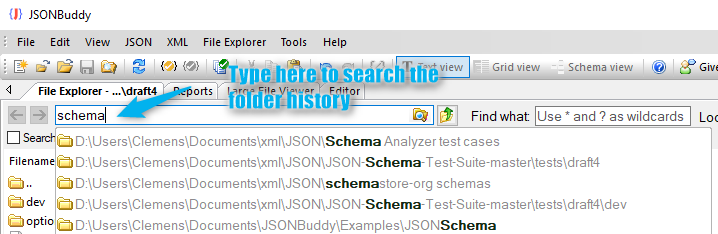
Use the standard open workflow or the built-in File Explorer for a known folder. The retained Help describes selecting several files and using a folder-history field. Verify current matching and history behavior with a small working set, then check every opened tab before editing.
Move between open documents safely
Keep related data and schema files identifiable, save changes deliberately, and validate the intended document after an edit. The historical Help describes forward and backward document cycling; confirm the current shortcut behavior instead of relying on an old key combination.