Validate JSON reliably

JSON validator tool — fast, comprehensive and fully compliant

Find syntax errors and JSON Schema violations with actionable diagnostics, then fix them in the built-in Windows JSON editor or move the same checks into automation.

Detailed JSON Schema validation diagnostics in JSONBuddy
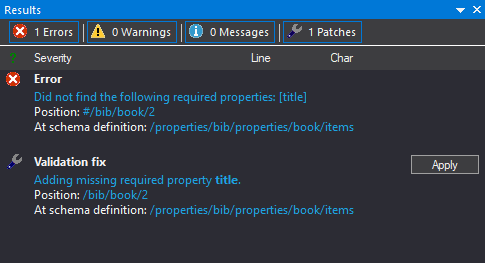
Detailed diagnostics connect the failing JSON location to the schema constraint that produced the result.
  • Text + gridChoose the clearest view
  • Precise diagnosticsUnderstand each result
  • CLI + CIAutomate repeatable checks

Complete validation package

Validate the document, the schema, and the workflow

JSONBuddy combines JSON syntax checking, JSON Schema validation, schema validation, and focused error navigation in one Windows environment. Use an interactive check while editing, inspect every reported location, and move a stable rule into batch or command-line processing without losing the distinction between those workflows.

Check syntax and structure

Start with JSON well-formedness so parsing errors are clear before schema constraints are evaluated. With a schema assigned, validate properties, required content, data types, and structural rules described by that schema.

JSON Schema can serve as both a machine-readable contract and human-readable documentation for JSON exchanged by applications and web services.

Work with established JSON Schema drafts

The retained page names draft 4, 6, 7, 2019-09, and 2020-12 and also documents validation of JSON Schema documents themselves. Keep those search terms visible while verifying exact conformance and vocabulary behavior against the release candidate.

The legacy workflow also supports custom format definitions; confirm their current configuration and scope before publication.

Turn diagnostics into corrections

Review the complete result set instead of stopping at the first finding. Each useful diagnostic connects the failed JSON instance location with the related schema location and message, so the document value and governing rule can be examined together.

Jump-to-error navigation returns the editor to the relevant content for correction and another validation pass.

A concrete Windows workflow

Move from an open JSON file to a verified correction

  1. Open the JSON document from the Windows editor or its built-in File Explorer.
  2. Assign the intended root JSON Schema in Quick Associations and confirm that the document is using the expected schema context.
  3. Use background feedback to address immediate syntax or schema findings, then run the explicit validation command for the complete Results list.
  4. Select a result, compare its instance and schema locations, correct the JSON data or schema rule, and validate again.
  5. Preserve a known-good example and expected result when the schema becomes part of an automated contract test.

The production reference documents F11 for explicit validation. Recheck the current menu label, shortcut, pane names, and background-validation behavior before release.

Two questions, one result set

A well-formedness check answers whether the text is valid JSON syntax. JSON Schema validation answers whether that valid JSON satisfies the assigned contract. Keeping the two stages clear makes diagnostics easier to interpret and prevents a parsing failure from being described as a schema violation.

Collections and large inputs

Choose interactive, batch, or streaming validation deliberately

Use the editor for a document that needs investigation and correction. For a selected collection, the retained batch workflow can apply a shared validation setup, preserve detailed status in a log, and pass a tested configuration to the Windows command-line validator.

  • Multiple documents: run well-formedness checks for selected JSON files and open a failed document for inspection.
  • Repeatable batch: keep the chosen inputs, schema context, and output log together in a configuration that can be re-run.
  • Large JSON data: use the dedicated streaming-oriented path when ordinary editor processing is not the right fit.
  • CLI / CI: automate a validated Windows invocation and retain its log and version context with the build result.
Current-release verification

Confirm supported drafts, custom formats, batch settings, return behavior, streaming limitations, Windows requirements, and edition availability before publication. No performance or maximum-size guarantee is implied without a reproducible measurement record.

Platform availability

Choose where to run this workflow

Only platforms supported by approved evidence for this specific workflow are shown. Links are limited to implemented, verified destinations.

  • Desktop / WindowsFeatured access: assign schemas, validate while editing, inspect results, and correct JSON in the Windows application.
  • CLI / CIAvailable for repeatable Windows command-line and CI checks after the invocation is tested.

Continue the journey

Use the right validation path

Follow the task guide for the detailed editor sequence, use the Article for the shorter feedback loop while editing, or move to the dedicated batch, schema-testing, and large-data pages when those are the central requirement.