

Describe each custom format in JSON
The retained workflow opens a standard JSON configuration document from JSONBuddy. Add one object per format, using format for the identifier referenced by a JSON Schema and regex for the regular expression used by the validator.
[
  {
    "format": "my-custom-format",
    "regex": "^[a-zA-Z/]+$"
  }
]
Keep the expression, examples, and configuration revision together. A regular expression can describe a useful lexical rule, but it does not replace a complete data-contract test.
Save and reload the definitions
- Use the retained Open JSON validator custom formats command to open the configuration.
- Add or revise the
formatandregexstrings, then save valid JSON. - Use Reload JSON validator custom formats so open documents are checked with the changed definitions.
- Validate one matching value and one deliberately non-matching value.
The legacy article introduced this behavior with JSONBuddy 4.6. Treat the command names, configuration location, reload scope, regular-expression engine, and edition access as release-sensitive; confirm them with the current Windows release before publication.
Treat an override as an intentional contract change
A user-defined identifier can replace a built-in format definition in the established workflow. Record that override explicitly because the same schema can produce a different result on a validator that uses the built-in meaning or ignores format assertions.
Verify editor assistance and validation together
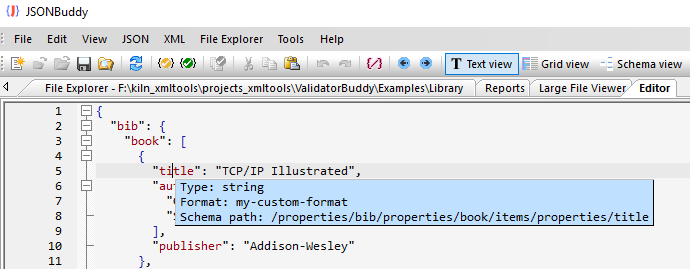
The original library example exposes the custom format name while editing JSON data. Use that assistance to confirm the intended schema association, then run validation and review the actual result rather than treating a tooltip as proof.
Continue with a controlled validation path
Use the JSON validator for the solution overview, instant-validation guidance for the editing loop, or the validator Help task for a complete correction workflow.