

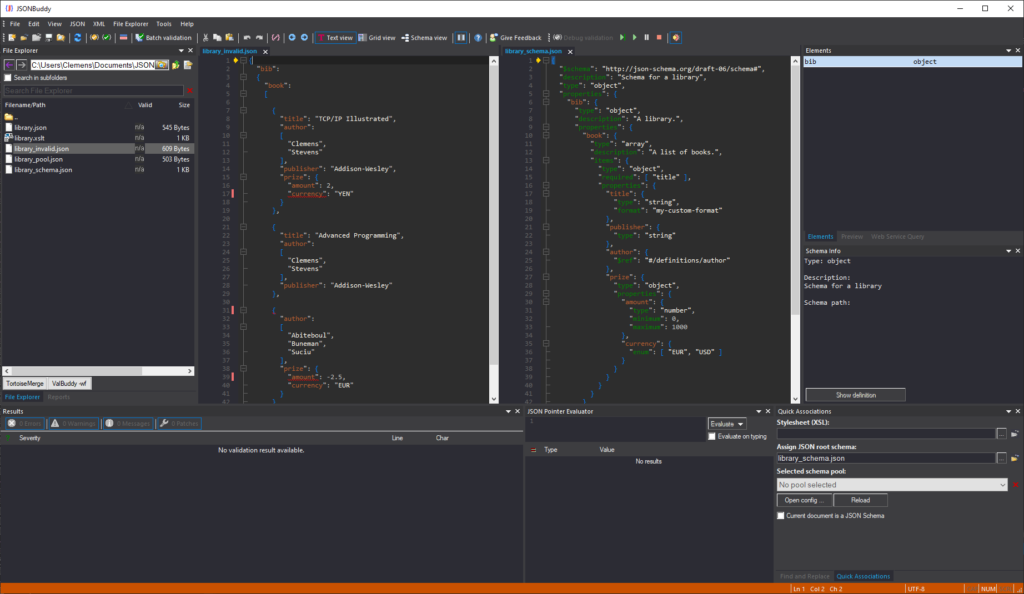
Start with the data and intended root schema
Begin a validation debugging session only after confirming the JSON instance and schema association. The retained Windows workflow arranges the instance beside the root JSON Schema and marks the current validation locations, keeping the data node and governing schema branch visible together.
Step, run, and stop at useful evidence
The legacy debugger provides familiar step and run controls, including a single-step shortcut and an option to break on a validation error. Exact toolbar labels, shortcuts, and edition access are release-sensitive; verify them against the current Windows release before publishing them as instructions.
At each stop, compare the highlighted data with the active schema keyword and the usual validation indicators. This diagnostic context helps explain whether the validator entered a branch, followed a reference, or reached an error at the location being investigated.
Place breakpoints in data and schema resources
- Set a breakpoint at the JSON data location whose validation path needs explanation.
- Add a breakpoint in the root or a referenced JSON Schema file when a particular constraint must be observed.
- Run to the next breakpoint or diagnostic and compare the highlighted instance and schema locations.
- Use the visible result details and context indicators to decide whether the data, schema, or resolution context needs correction.
Breakpoints in referenced schema files are especially useful when a large contract delegates validation through $ref; confirm that the intended resource is loaded before drawing a conclusion.
Edit carefully during an active session
The retained workflow permits editing JSON data while debugging and moving from one error to the next. Small value corrections can remain understandable within the session. After major structural changes to the JSON input, restart validation because subsequent recorded locations may no longer map to the revised document.
Restart after schema changes
Restart the debugger whenever a JSON Schema file is modified. A fresh session avoids reasoning from an evaluation state built from an older schema structure or referenced resource.
Turn one investigation into repeatable evidence
Use the JSON Schema tester for a managed set of expected cases, the JSON Schema editor for contract changes, or debugger Help for current task instructions.