

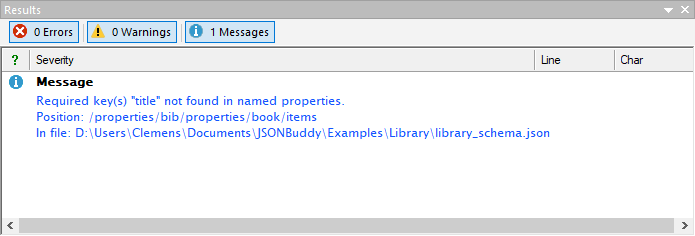
Recognize drift between required and properties
A schema can be edited so that a property definition is removed while its name remains in the required array. The contract then still requires that name, but the nearby property definition no longer documents or constrains its value as intended.
Use the analyzer warning as a review starting point
The retained JSONBuddy analyzer reports that the required key is not found in the named properties and identifies the schema position and source file. Confirm the current wording, severity, draft behavior, and background-update timing against the release candidate before treating the screenshot as current UI documentation.
Correct the contract deliberately
- Inspect the reported schema branch and repository history.
- Decide whether the property definition was removed accidentally or the required name is obsolete.
- Restore the intended property definition or remove the stale required entry.
- Validate the schema and review the analyzer result again.
Do not make both changes merely to silence the warning. The correct action depends on the data contract the application is meant to enforce.
Retest valid and invalid JSON data
After the correction, run at least one JSON instance that should contain the property and pass, one that omits the required property and should fail, and one that supplies a value violating the restored property definition. These cases check the requirement and the value constraints separately.
Keep schema maintenance evidence connected
Use the JSON Schema analyzer for related findings, the JSON Schema linter article for unresolved references, or the JSON Schema tester to preserve the corrected cases.