Import CSV text
Read CSV from spreadsheets, databases, or text exports; choose the separator and encoding; rename or exclude columns; and create JSON, XML, or HTML.

Convert JSON, CSV, and XML
Transform structured data between JSON, CSV, XML, and HTML while keeping import choices, mapping, preview, and output verification visible.
Core conversion workflows
JSONBuddy keeps the source, mapping choices, preview, and generated result close enough to inspect before the transformed data enters another application or automated process.
Read CSV from spreadsheets, databases, or text exports; choose the separator and encoding; rename or exclude columns; and create JSON, XML, or HTML.
Transform documents in either direction, configure the conversion in a dedicated dialog, and preserve XML attribute or namespace information when the target needs it.
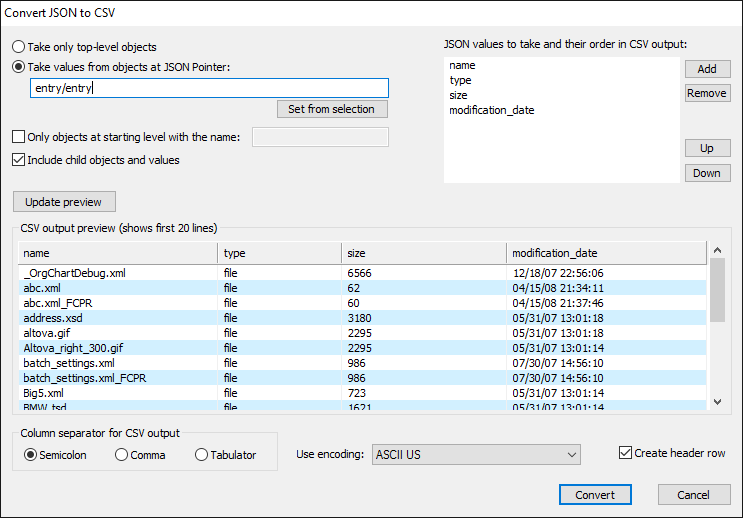
Select child objects and values with JSON Pointer paths, preview the tabular rows, and generate CSV for Excel or another CSV-aware application.
A concrete JSON-to-CSV workflow
Re-test command labels, supported directions, XML namespace and attribute mapping, JSON Pointer behavior, escaping, encodings, separators, large-file processing, and output placement against the current product.
Beyond one interactive conversion
Conversion can remain an editor task, move to a command-line workflow for repeatable processing, or feed an HTML result through an XSLT stylesheet when the output needs a human-readable presentation.