

Use a pointer/value export when structure must remain visible
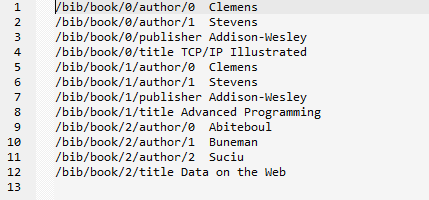
The retained JSONBuddy workflow creates CSV rows that pair a JSON Pointer with the JSON value stored at that location. This is different from choosing selected object fields as CSV columns: it preserves a flattened record of nested values so another process can inspect or reconstruct the source structure deliberately.
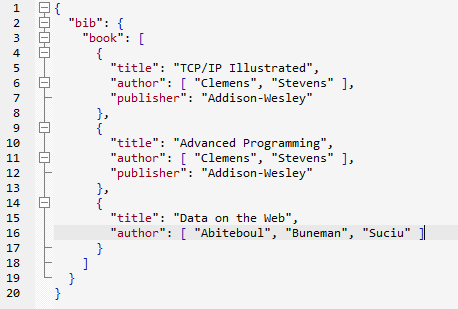
Generate the pairs from the active JSON document
- Open and review the JSON document that will be converted.
- Use the retained Convert JSON to pointer/value pairs command.
- Inspect the generated CSV before editing or saving it.
- Keep the source JSON with the result until the downstream use has been verified.
The legacy article associates this command with JSONBuddy 5. Confirm current command names, output handling, CSV escaping, data types, and edition availability with the current Windows release before publication.
Verify meaning before using the CSV elsewhere
- Check representative pointers for object names, array indexes, and escaping.
- Confirm that the values and row count match the intended JSON scope.
- Do not treat a pointer/value CSV as a conventional business-table export without documenting its two-column meaning.
- Test any reconstruction or Excel import process with a small known JSON sample.
Continue with the correct conversion path
Use JSON, CSV, and XML conversion for selected-column workflows, large JSON to CSV for file-aware conversion, or conversion Help for current task guidance.