

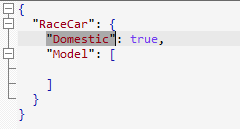
Recognize the limit of a one-line document
Code folding depends on a readable line structure. A compact JSON object may still be valid JSON, but when all nested content occupies one line there is no practical line range for an editor to collapse. Treat that as a display and workflow choice, not as evidence that the JSON hierarchy is missing.
Pretty-print before using folding
- Open the compact JSON document and confirm it is the intended input.
- Use the retained JSON pretty-print command.
- Review the expanded indentation and folding markers before collapsing a branch.
- Keep the original input or use a separate copy when its exact whitespace is operationally significant.
The historical article names Ctrl+Shift+P and says the current selection is preserved. Confirm current shortcuts, selection behavior, whitespace handling, and large-file suitability with the current Windows release before treating them as fixed instructions.
Use folding as a navigation aid, not a content change
Folding reduces visual noise while you inspect a nested object, but it does not validate the data or prove its schema. Expand the relevant branch, validate when a contract applies, and use a text or Large File view suited to the document size.
Continue with readable JSON evidence
Use JSON pretty-print guidance for the formatting workflow, indentation guidance for spacing choices, or the formatter overview for the broader capability.