Format JSON clearly

JSON Prettify - JSON pretty print for input of any size

Turn compact or difficult-to-read JSON into consistently indented text, remove whitespace when compact output is required, and choose an editor, file-based, or automated Windows workflow for the input at hand.

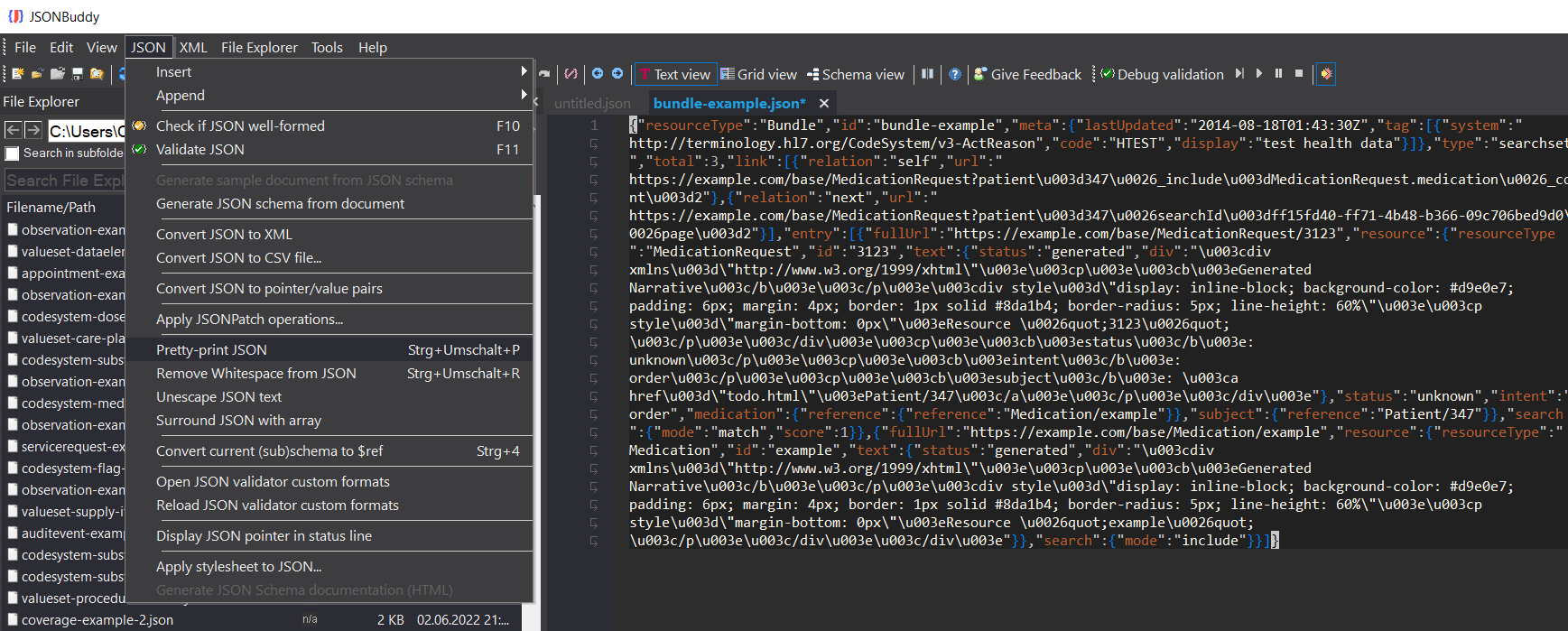
JSONBuddy Windows editor with the JSON menu open and Pretty-print JSON and Remove Whitespace commands visible
The authentic Windows product screenshot shows the pretty-print and whitespace-removal commands beside the active JSON document.
  • Pretty-printAdd indentation and line breaks
  • MinifyRemove unnecessary whitespace
  • Large filesProcess selected input on disk

Readable JSON on demand

Format, prettify, and pretty print JSON data

Pretty-printing changes presentation rather than the JSON data model: it adds consistent indentation, line breaks, and spacing so objects, arrays, names, and values are easier to inspect. JSONBuddy’s established Windows workflow keeps the source in a real JSON editor, where syntax highlighting, navigation, validation, patching, and conversion remain available after formatting.

1

Open the intended JSON document

Load the input in JSONBuddy and confirm that the active document is the one you intend to change. For an important source file, retain an unchanged copy or use version control before applying an in-place formatting command.

2

Choose readable or compact output

Use the documented Pretty-print JSON command when people need to read or review the file. Use Remove Whitespace when compact JSON is the required output. These operations answer opposite presentation needs and should remain distinct.

3

Inspect and verify the result

Review nesting and escaped content, save to the intended location, and run the relevant syntax or schema check before replacing a downstream artifact. The legacy page documents Ctrl+Shift+P for pretty-printing; confirm the current command names and shortcuts against the release candidate.

Large JSON on disk

Pretty-print a selected file without making editor loading the first step

The production workflow uses JSONBuddy’s built-in File Explorer for large inputs. Select the JSON file, open its context menu, choose the documented pretty-print operation, and review the generated file on disk. This keeps the file-based path distinct from interactive editing and from command-line automation.

The legacy source describes inputs with millions of lines, but this redesign does not publish a size or performance guarantee. Verify output naming, overwrite behavior, encoding, error handling, memory use, and practical input limits with representative release-candidate files.

Formatting is not validation

A prettified document can still violate its JSON Schema, and a minified file can still contain the same data defect as its readable source. Run the required well-formedness and schema checks as a separate verification step.

Repeatable formatting

Move a proven operation into automation

The retained production page documents pretty-print and minify operations in the included Windows command-line tool. The current public Web API also publishes a POST /api/jsonlinter/prettyprint operation for objects, arrays, and primitive JSON roots. Its contract states that requests up to 10 KiB do not require an API key; larger requests require X-Api-Key.

Test CLI switches and API error handling against the release contract before depending on either path.

Choose the adjacent formatting task

Platform availability

Choose where to run this workflow

Only platforms supported by approved evidence for this specific workflow are shown. Links are limited to implemented, verified destinations.

  • Desktop / WindowsAvailable for interactive formatting and File Explorer operations in JSONBuddy for Windows.
  • CLI / CILegacy product evidence documents pretty-print and minify operations in the Windows command-line tool; verify the release contract before automation.
  • Web APIThe current public OpenAPI contract supports JSON pretty-printing; the platform badge remains unlinked until the controlled Web API page is implemented and verified.