Choose the operation
Work with ordered operations such as add, remove, replace, move, copy, and test. Each row exposes only the fields needed for that operation.

Build and inspect JSONPatch changes
Create an ordered JSONPatch array beside the active JSON document, apply operations one at a time, inspect each result, and keep the final document only when the patch behaves as intended.
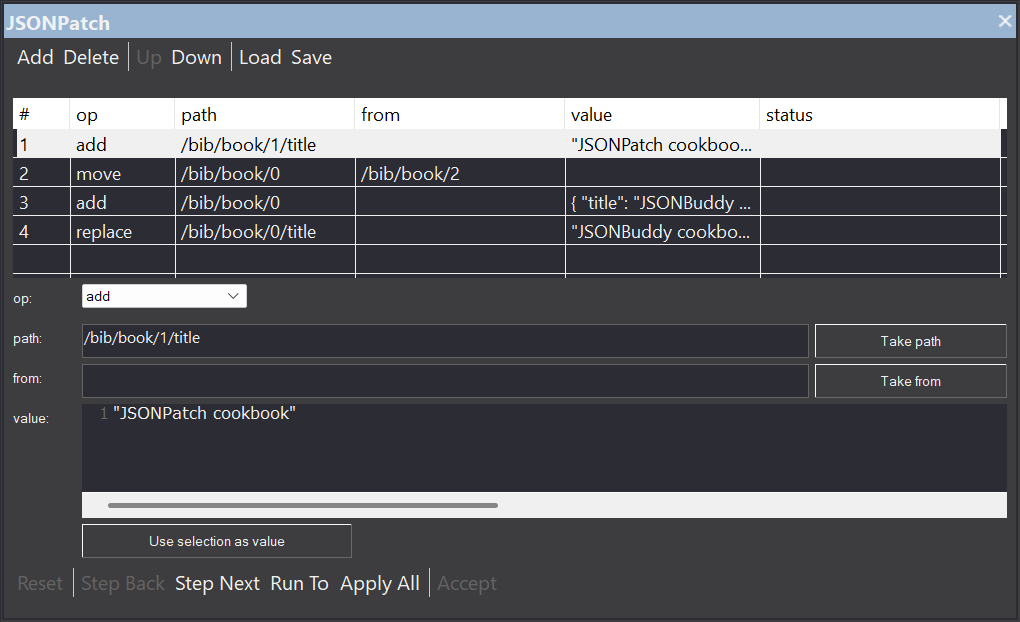
Structured patch authoring
The production evidence shows a dockable JSONPatch Builder and Debugger pane inside JSONBuddy for Windows. It works with standard JSONPatch array documents and keeps the operation list beside the JSON data being changed. Authors can load, save, add, delete, edit, and reorder operations without hiding their sequence.
Work with ordered operations such as add, remove, replace, move, copy, and test. Each row exposes only the fields needed for that operation.
Edit path, from, and JSON value content while keeping JSON Pointer syntax and the active document structure visible.
Move operations up or down before running the patch. Order matters because a later path can depend on an object, array item, or value created or moved by an earlier operation.
Debugger-style execution
The retained workflow applies operations from top to bottom and exposes controls for moving through the list at different speeds. Confirm all labels and behavior against the release candidate before publication.
Reset returns to the session start, Step Next applies the next operation, and the production source documents Step Back through the active editor undo stack.
Run To applies operations through a selected row, while Apply All processes the remaining list. Accept keeps the current patched result when it has been reviewed.
The documented pane marks operation status, identifies the next row, stops at the first failed operation, and moves the editor selection to the related patch position where possible.
Editor-aware helpers
A hand-written JSON Pointer is precise but easy to mistype. The pane can take the selected JSON value’s pointer for path or from, and it can use selected JSON text or a selected value as the operation’s value.
Confirm pointer escaping, array indexes, move/copy source behavior, test values, and the effect of earlier operations. A helper reduces transcription work; it does not prove that the patch expresses the intended change.
Session safeguards
The production page documents a warning when the JSON document changes outside the active patch workflow. Pane-driven undo and redo checkpoints are refreshed during legitimate stepping, while operation edits, reordering, loading, reset, acceptance, and failed execution update the session state.
Re-test stale-document detection, undo-stack integration, failed-operation recovery, load/save behavior, unsaved-change prompts, and the exact effect of Reset and Accept in the current release.
A distinct workflow
This pane is documented for JSONBuddy’s interactive Windows editor. It does not replace the Results-pane workflow for schema-validation fixes and is not presented as an XML ValidatorBuddy feature. Keeping those paths distinct prevents a generated correction from being confused with a hand-authored JSONPatch session.
Platform availability
Only platforms supported by approved evidence for this specific workflow are shown. Links are limited to implemented, verified destinations.
Current-release boundary
Confirm product edition, Windows requirements, supported JSONPatch operations, pointer behavior, command names, keyboard behavior, patch-file compatibility, diagnostics, undo/redo integration, and download or licensing terms. No CLI, Web API, agent, or browser implementation is claimed for this interactive pane.