

Describe a change as ordered operations
A JSONPatch document is an array whose operations run in sequence. This example copies the first item under baz to a new property named boo:
[
  { "op": "copy", "from": "/baz/0", "path": "/boo" }
]
Applied to { "baz": [{ "qux": "hello" }], "bar": 1 }, the result retains the existing data and adds "boo": { "qux": "hello" }. Test this example and every supported operation against the release candidate before describing current coverage as complete.
Apply a patch to selected files
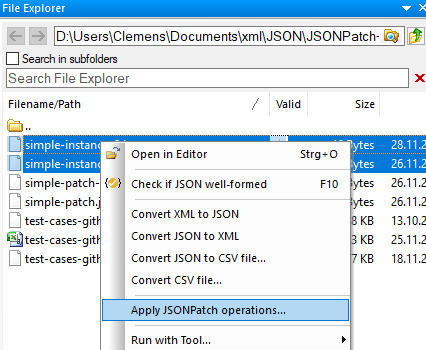
- Select one or more JSON data files in JSONBuddy's built-in File Explorer.
- Open the context menu and choose the documented Apply JSONPatch operations command.
- Select the JSONPatch array in the standard Windows file dialog.
- Inspect each output, confirm the target files and naming behavior, then validate the patched JSON.
For the active editor document, the production article records the same operation under the JSON menu. Confirm command labels, overwrite safeguards, partial-failure behavior, encoding, and undo integration before publication.
Move repeatable patches to the Windows command line
The legacy page documents a valbuddy.exe -patch workflow in which the patch array is followed by one or more JSON data documents. Treat the switch, argument order, executable packaging, output naming, exit codes, and diagnostics as release-sensitive until tested with the shipping Windows command-line package.
Verify more than well-formedness
- Review operation order because later paths can depend on earlier changes.
- Compare the patched data with the intended result, including arrays and escaped values.
- Run JSON Schema validation when the output must satisfy a contract.
- Retain the source or use version control until the result has been accepted.
Build and debug the patch interactively
Use the JSONPatch Builder and Debugger to author and step through operations, or return to JSON formatting when the required change is presentation-only.