

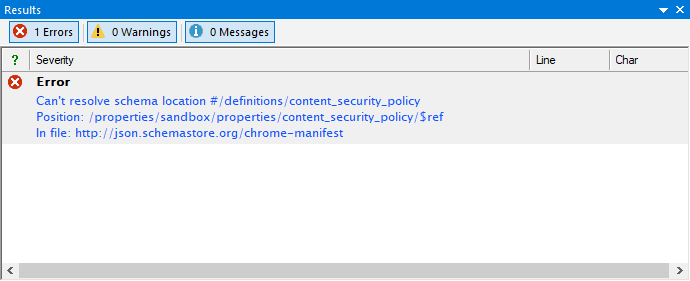
Use background analysis while the schema is in context
The built-in JSON Schema analyzer acts as a linter beside the Windows editor. When it has a finding, it reports a message in the Results window so the author can inspect the relevant schema branch before the surrounding change is forgotten.
This background signal complements schema validation and instance tests. The exact checks, severities, draft behavior, and update timing must be verified with the current release.
Investigate an unresolved $ref
An unresolved reference can mean that a referenced resource is missing, cannot be loaded, or does not contain the JSON Pointer target named after the fragment. Read the complete diagnostic: the reference text, pointer position, and resource location help distinguish those cases.
- Confirm the referenced schema file or URI is available in the intended resolution context.
- Open the target resource and verify every JSON Pointer token and escape.
- Check whether a definition was renamed, moved, or removed.
- Validate representative JSON data after correcting the resource or reference.
Use version control to explain the change
The retained example describes a definition removed accidentally from a large schema. Compare the finding with repository history to identify the change that removed or renamed the target. Restore it only when that matches the intended contract; otherwise update the reference and tests deliberately.
Verify beyond the linter message
Resolving the message proves that the analyzer can locate the target in the checked context. It does not prove that the referenced schema expresses the correct business rule. Rerun schema validation and expected-valid and expected-invalid instance tests.
Continue with focused schema diagnostics
Use the JSON Schema analyzer for the complete finding model, reference-resolution guidance for navigation, or the JSON Schema tester for regression evidence.