

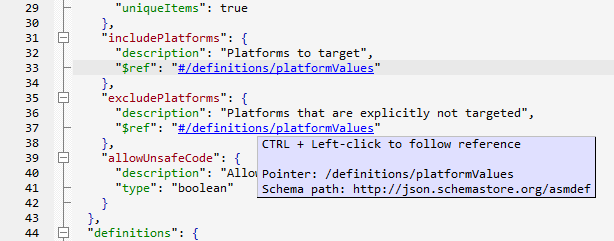
Navigate references in their schema context
JSON Schema documents often distribute reusable definitions across a single document or related resources. The retained JSONBuddy editor resolves the target location of $ref values in the current schema and presents the reference as an active link when it can be resolved.
Inspect the target before you follow it
Move over a resolved reference to review the JSON Pointer and schema path shown by the editor. That context helps distinguish a local definition from an external resource and gives a reviewer a specific target to check before changing a constraint.
Follow the link and return
- Open the JSON Schema document in the editor and identify the
$refto inspect. - Confirm that the displayed pointer and schema path identify the expected target.
- Use the documented Ctrl + left-click action to move to the resolved schema node.
- Use the navigation-history back shortcut, documented as Ctrl + Shift + ,, to return to the reference.
Re-test exact pointer resolution, keyboard behavior, external-resource handling, and the current shortcut labels against the shipping Windows release—especially where schemas depend on a pool or remote resource.
Continue with schema design
Use the JSON Schema editor to author and analyze the contract, assign a JSON Schema to data under review, or test the schema against a collection once the reference structure is understood.