

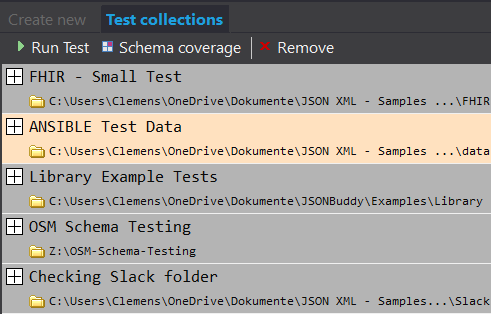
Test a data collection against its schema
A JSON Schema tester checks how a set of JSON data files validates against a selected schema resource. It is useful during schema design and when repeatable data checks need more context than a one-off online validator. JSONBuddy’s established workflow can use a schema file or a schema pool and test data accessible from one local folder.
Create a repeatable test entry
- Open the Testing pane and select Create new.
- Name the entry so the schema and data set are clear to the next reviewer.
- Select the JSON Schema resource or the schema pool that provides it.
- Select the local folder containing the JSON test data, add the test, then run it from Test collections.
After a run, inspect the detailed validation errors, warnings, and processing information for each file. The production workflow records a separate log for each run; confirm log location, retention, and current command labels with the release candidate.
Compare results and inspect coverage
The retained tester records a reference result that can be compared with later runs. It also exposes schema definition coverage, showing which parts of the selected schemas were exercised by the test data. Treat a coverage result as a review aid: confirm that the intended positive and negative cases are represented before relying on it as evidence of completeness.
Verify the test configuration
- Open at least one failed and one expected-valid result to confirm the intended schema resolution context.
- Keep the input folder and the selected schema version identifiable for a repeatable run.
- Review changed results against the reference, then investigate the relevant data or schema change.
- Re-test support for specific drafts, schema pools, logs, report output, and coverage behavior against the shipping Windows release.
Continue with the closest workflow
Use the JSON Schema tester for the capability overview, the JSON Schema editor to change the contract, or validation Help for a focused correction sequence.