Test APIs and data contracts

The Ultimate JSON Schema Testing Tool

Run a repeatable set of JSON data files against schema resources, compare the result with a known reference, and inspect which schema definitions the test data exercised.

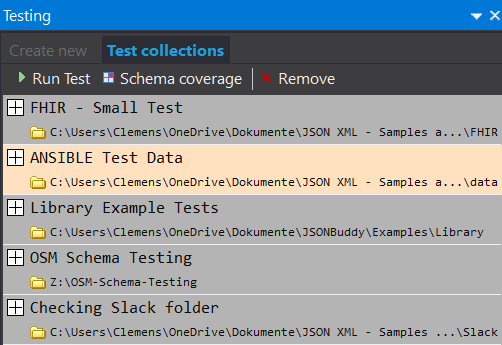
JSONBuddy showing JSON Schema test collections and their result status
The authentic Windows product view shows schema test collections and their recorded results.
  • CollectionsTest multiple JSON files
  • RegressionCompare with a reference result
  • CoverageInspect exercised schema definitions

A repeatable schema test

Check more than one example and keep the result reviewable

A JSON Schema tester evaluates how a set of JSON data files behaves against one or more schema resources. That makes it useful while a contract is being designed and later when representative examples need to guard the expected valid and invalid cases.

Test multiple data files together

Define the JSON Schema file or schema pool, select a collection of JSON documents, and run the collection without repeatedly pasting data into a browser form. The established workflow expects the test data to be accessible from a local folder in the Windows environment.

Compare against a reference result

Record an accepted result, then compare later runs with that reference to expose a changed status or message set. A reference result supports regression review, but it still needs deliberate maintenance when the intended contract changes.

Inspect schema definition coverage

Collect coverage information to see which parts of the schema resources were exercised by the current data set. Coverage identifies unexercised definitions; it does not by itself prove that every boundary value or business rule has been tested.

Test construction

Move from schema resources and examples to a stable test collection

  1. Open or create the JSON Schema resources in JSONBuddy for Windows.
  2. Prepare representative JSON documents, including expected valid and invalid cases.
  3. Create a schema test and associate the intended schema file or schema pool.
  4. Add the locally accessible test data files and run the collection.
  5. Inspect the overall status, errors, messages, and coverage before accepting a reference result.
  6. After a schema or data change, run the same collection and review every difference.
Keep expected failures explicit

A useful contract suite includes data that should fail as well as data that should pass. Record why each invalid example is expected to fail so a changed diagnostic can be distinguished from an intended schema revision.

Coverage report

Find schema branches that the current examples do not exercise

Once the schema resources and data set are defined, the retained workflow can generate a coverage report for the current test. Review the specific definitions reached by the data and identify branches that need additional examples.

  • Keep the schema version and test-data revision with the report.
  • Investigate unexercised alternatives, conditional branches, and referenced definitions.
  • Pair coverage with expected outcomes and diagnostic review.
  • Regenerate the report after material schema or fixture changes.
Release evidence required

The production source names drafts 4 through 2020-12, multiple-file tests, reference comparison, summary reports, coverage collection, and real-time editor validation. Confirm exact draft support, report fields, comparison semantics, folder requirements, edition access, and current UI labels before publication.

Platform availability

Choose where to run this workflow

Only platforms supported by approved evidence for this specific workflow are shown. Links are limited to implemented, verified destinations.

  • Desktop / WindowsFeatured access: create and run schema-test collections, inspect results, edit resources, and generate coverage in JSONBuddy for Windows.
  • CLI / CIA separate Windows CLI path exists for validation automation; schema-test switches and output contracts require current-release verification.

Related schema work

Use testing beside editing, analysis, and instance validation

Build and resolve the schema in the editor, use the analyzer for background structural findings, and keep instance validation distinct from the repeatable schema-test collection described here.

Shared schema resolution

Use a configured pool when a collection depends on related resources

A schema-test collection needs a stable resource context. The retained JSON Schema pool Article explains how the desktop workflow groups schema files, selects a root resource, and applies a configuration change before validation.