Check keywords and declared types
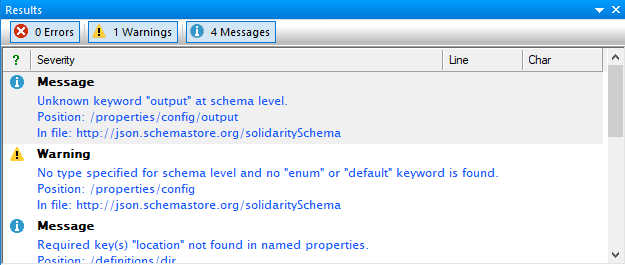
Find a missing type, an unknown type specifier, a keyword that is not recognized for the selected draft, or a keyword used more than once in one schema branch.

Analyze JSON Schemas
Review structural and quality findings while a JSON Schema is being edited, then return directly to the definition or reference that needs attention.
A companion to schema validation
The JSON Schema analyzer runs beside the Windows schema editor and reports findings as errors, warnings, or informational messages. It complements formal schema validation by looking for unresolved references, inconsistent constraints, unused definitions, and patterns that deserve an author’s review.
A reported message is evidence to inspect, not an automatic instruction to rewrite the schema. Some constructs are draft-specific or intentional, so the author still decides whether the finding represents a defect.
Find a missing type, an unknown type specifier, a keyword that is not recognized for the selected draft, or a keyword used more than once in one schema branch.
Report a local $ref whose JSON Pointer cannot be resolved, an external reference whose schema cannot be loaded, or a recursive reference that needs deliberate review.
Flag cases such as maximum below minimum, maxLength below minLength, or array-related keywords used without an array type.
Findings retained from the established analyzer
not, an empty pattern, or the draft-specific handling of an empty required array.The production source explicitly distinguishes messages, warnings, and errors. Confirm the current list of checks, severity mapping, wording, draft behavior, external-resource loading, and any configuration controls before publication.
Platform availability
Only platforms supported by approved evidence for this specific workflow are shown. Links are limited to implemented, verified destinations.
Use the finding
Continue the schema workflow