
Help page

JSONBuddy Help

Open large data in the JSON editor

Open a known large JSON file, choose a view that suits its size, and confirm the result before editing or validating it.

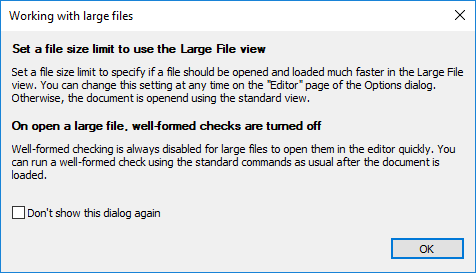
JSONBuddy for Windows information dialog shown when opening a large document
Authentic Help evidence of the historical large-file guidance dialog.

Open a representative file first

  1. Keep an unchanged copy of the large JSON file.
  2. Open it in JSONBuddy and wait for the selected view to load.
  3. Confirm that the document is readable and that navigation suits the immediate task.

The legacy Help describes a standard view and a special Large File view, and cites a historical size threshold. Treat the threshold, first-open dialog, memory behavior, and view naming as release-sensitive; test the current Windows build with representative data rather than treating a historic value as a limit.

Related tasks

Preserve a safe large-file workflow

Opening a file successfully does not mean that every editing, grid, formatting, or validation operation is appropriate at that size. Begin by browsing a stable copy, identify the smallest useful section, and avoid repeatedly switching views while the current build is being assessed. Record the file size, structure, available memory, build, and task when comparing behavior across machines.