
Help page

JSONBuddy Help

JSON/XML conversions

Choose the conversion direction, inspect the new document or files, and validate the result before using it downstream.

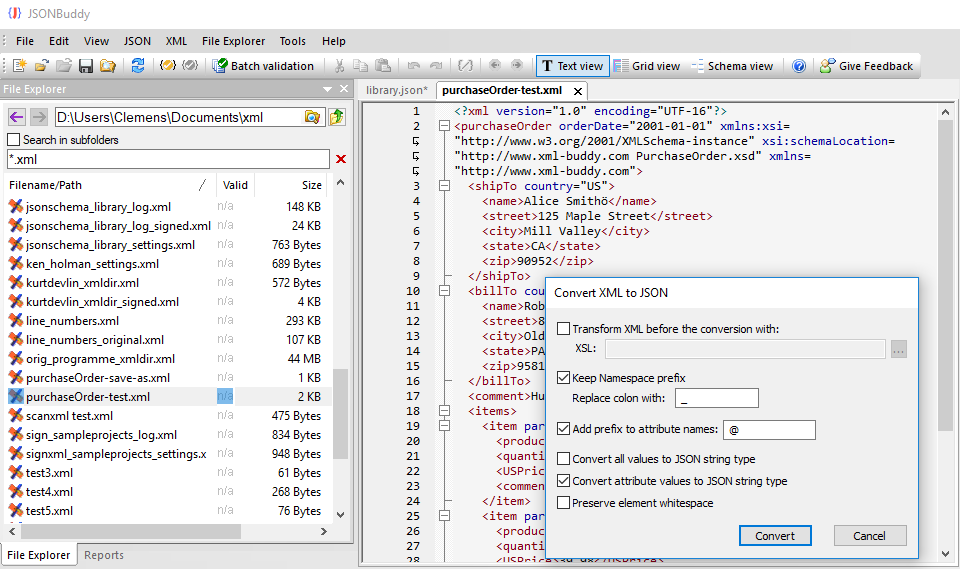
JSONBuddy for Windows showing JSON and XML conversion commands
Authentic Help evidence of the historical JSON/XML conversion workflow.

Convert the active document

  1. Open and review the source JSON or XML document.
  2. Choose the current conversion command for the intended direction.
  3. Inspect the new document before editing, saving, or sharing it.
  4. Run an appropriate well-formedness check on the generated format.

Use file conversion deliberately

The legacy Help also describes converting selected files from the built-in File Explorer and applying options such as XML preprocessing, attribute prefixes, and namespace handling. Confirm every current label, extension rule, output naming rule, and option in the active Windows release. Start with a disposable sample and inspect diagnostics if one file does not convert.

Related tasks

Inspect conversion semantics, not just syntax

Well-formed JSON or XML is a necessary check, but it does not show whether attributes, repeated elements, namespaces, arrays, and text values have the meaning expected by the receiving system. Compare a small source example and result side by side. Decide how the consumer represents attributes and namespaces before accepting the generated document.

For a selected-file workflow, preserve the source extension and output location until every result is reviewed. The retained Help describes avoiding an overwrite when a target already exists and reporting a message instead; confirm that behavior in the current release and do not assume it protects every folder or conversion direction.

Save a verified sample for each direction so later changes to source conventions, namespaces, or downstream contracts can be detected quickly.

Record the accepted output structure with the fixture.