

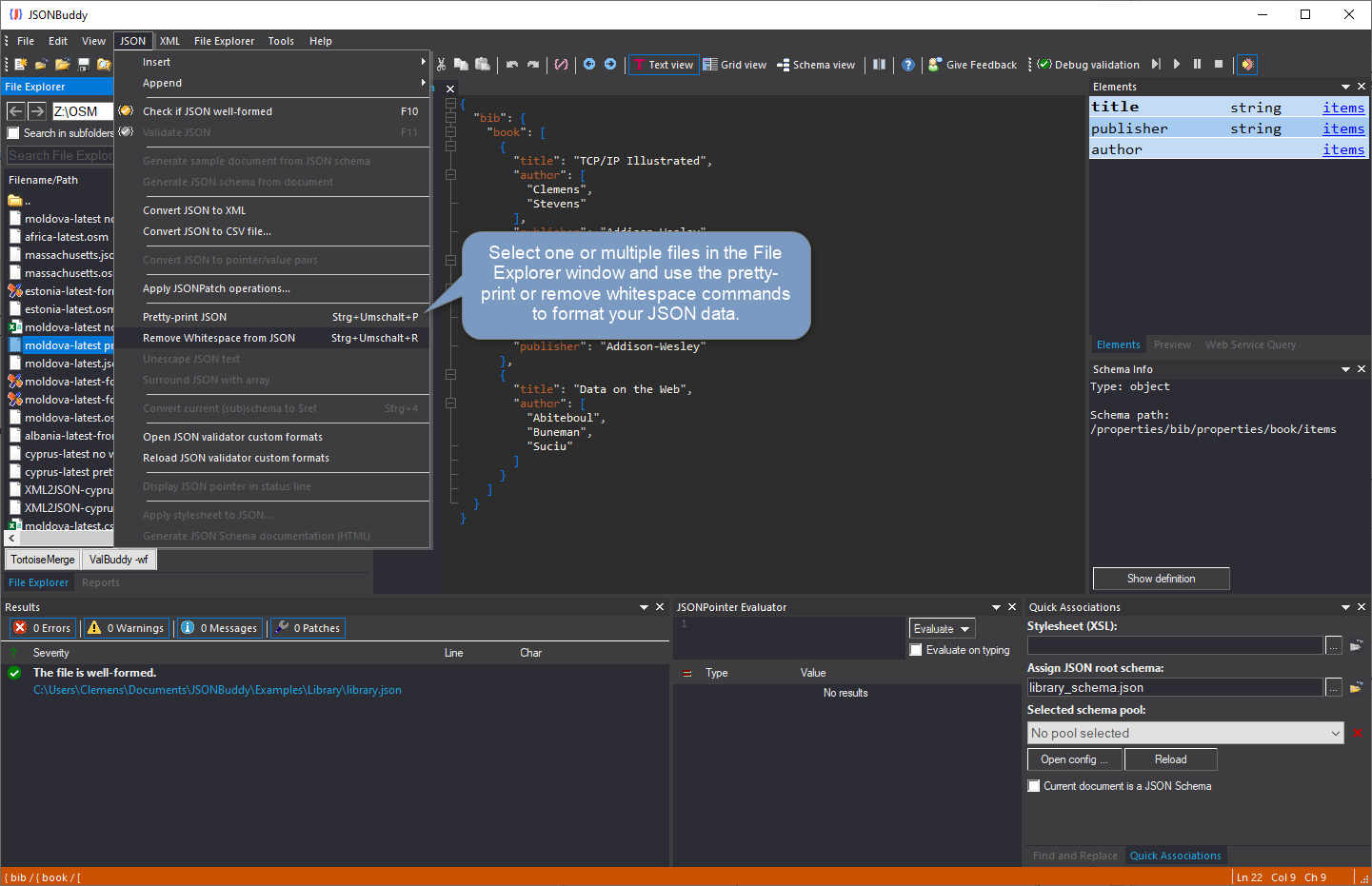
The supplied read-only Help source documents this task. The workflow below is corroborated by the retained production Article; verify every current menu label, overwrite choice, output filename, and file-size behavior before publication.
Before you start
- Choose a JSON file whose formatting or compactness needs to change.
- Keep an identifiable copy of the source document until the resulting file is reviewed.
- Use a file-aware workflow when the document is too large for an ordinary editor session.
Format or remove whitespace
- Select the JSON document in the current Windows File Explorer workflow.
- Choose the current Pretty-print JSON or Remove whitespace command that matches the intended result.
- Wait for processing to finish before opening the result.
- Open the generated output and check that it is well-formed JSON with the expected readability or compactness.
Verify the result
Pretty-printing changes presentation whitespace to make a document easier to inspect. Removing whitespace makes compact JSON easier to store or transmit. Neither operation proves that the JSON conforms to a schema, so validate separately when a contract applies.
Troubleshooting
If the expected file is not visible, do not assume the source was overwritten. Confirm the current release’s output naming and location, then retry with a small disposable sample. For very large files, use the large-data workflow rather than repeatedly loading the document into a normal text view.