Inspect the intended branch
Navigate to the relevant object or array and confirm the surrounding structure before adding, removing, or changing a value.

Edit JSON structurally
Use a Windows JSON view to inspect objects and arrays, make deliberate edits, and validate the result.
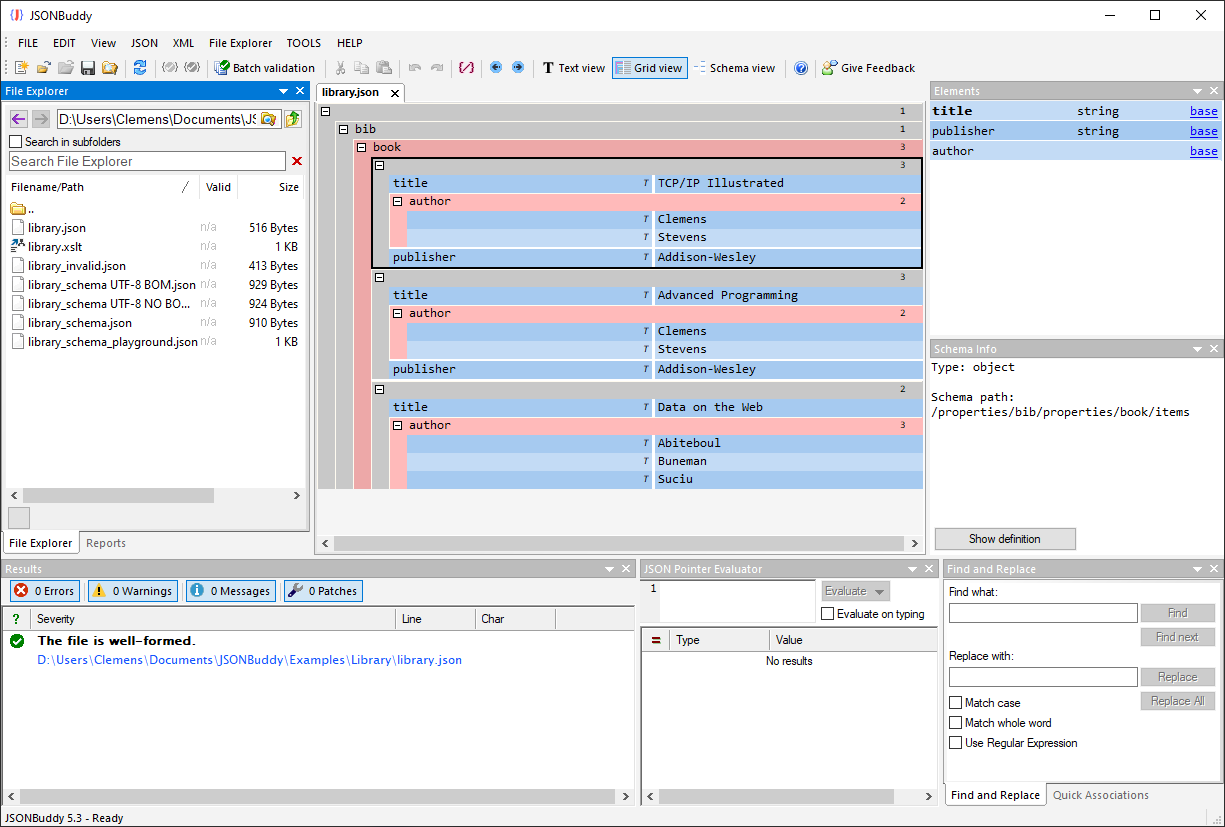
Create and review JSON structure
The grid editor presents objects, arrays, properties, and values in a structured Windows workspace. Use it when a document’s shape is easier to inspect than source text. A structural view clarifies a change but does not replace contract or validation rules.
Navigate to the relevant object or array and confirm the surrounding structure before adding, removing, or changing a value.
Keep each change reviewable, then inspect the generated JSON representation before saving a document.
Run a well-formedness check and, when a schema applies, review the instance and schema locations behind any diagnostic.
Grid editor workflow
The production page describes drag-and-drop, entry helpers, folding, navigation, undo/redo, and validation-result features. Confirm the current labels, availability, exact behavior, shortcuts, and edition scope in the supported Windows release before treating any historical control as a release promise.
A grid can make the shape of JSON easier to read and modify, but it does not establish business rules, external-reference resolution, or schema conformance. Keep validation as a separate explicit step.
Choose the right editing view
Large, wide, or deeply nested documents can be more practical in a text or large-file view. Start with a representative input, choose the view that remains responsive for the task, and keep an unchanged source until the result is reviewed.
Platform availability
Only platforms supported by approved evidence for this specific workflow are shown. Links are limited to implemented, verified destinations.