
Help page

JSONBuddy Help

Web Service Query window

Send a reviewed request, inspect raw and structured response data, and keep request data and results within the intended test context.

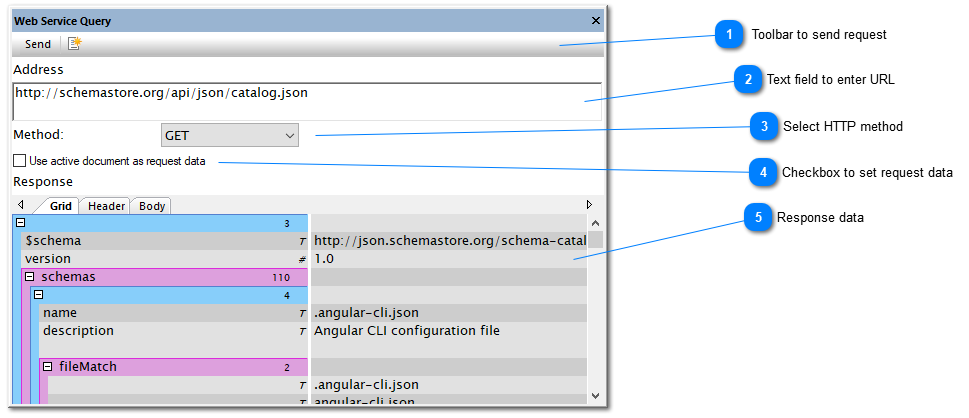
JSONBuddy for Windows Web Service Query window showing request and response areas
Authentic Help evidence of the Web Service Query window; current HTTP options must be confirmed.

Send a controlled request

  1. Use a safe test URL and confirm the intended HTTP method and query parameters.
  2. Only include active-document request data when its content is appropriate for that endpoint.
  3. Send the request, then inspect headers, body, and any structured view before creating a document from the response.

The legacy Help describes a Send command, a response-to-document command, raw Header and Body tabs, automatic grid population for well-formed JSON or XML, and Ctrl+C copying. Confirm all labels, method support, request-data handling, response retention, and clipboard behavior in the current Windows release.

Related tasks

Protect request and response data

Use test endpoints and non-sensitive sample data when confirming a request workflow. Inspect the full URL, query string, method, and active document before sending anything. A response that renders as JSON or XML may still contain values that should not be copied into a working document or shared outside the intended test environment.

Record the request context and result when investigating a service issue. The window can help inspect an exchange, but it does not replace the endpoint’s current API contract, authentication requirements, or server-side logs.