
Help page

JSONBuddy Help

Custom user tools

Add an external Windows tool deliberately, test its arguments with a safe file, and expose it only where the workflow is understood.

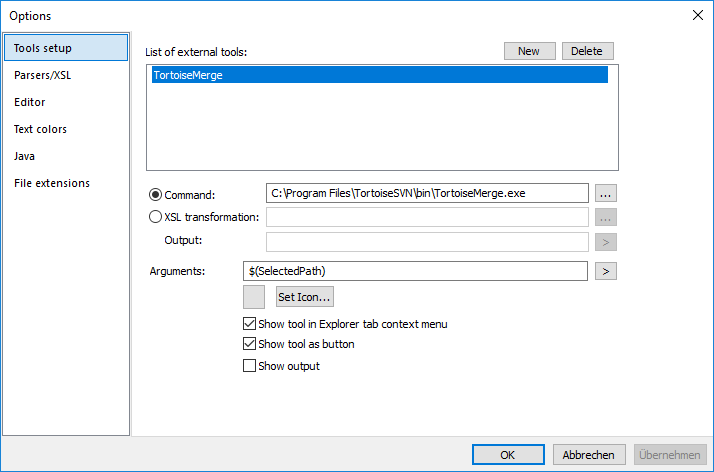
JSONBuddy for Windows custom user-tool configuration dialog
Authentic Help evidence of historical custom-tool setup; current supported tool types require confirmation.

Configure one tool at a time

  1. Open the current user-tool settings from the Windows application.
  2. Choose a trusted local executable or supported transformation and set its arguments.
  3. Quote file-path arguments when the current tool requires it, then test with a disposable file whose path contains spaces.
  4. Review the result before making the tool visible in an Explorer or toolbar workflow.

The historical Help refers to executables, Java classes, XSL transformations, predefined variables, and controls for buttons or menus. Confirm available tool types, argument expansion, quoting rules, security boundaries, and placement options in the current release before relying on them.

Related tasks

Keep external-tool integration safe and repeatable

Use only trusted local tools and review the exact executable path and arguments before saving a configuration. Test with a non-sensitive file and a path containing spaces, then inspect both the tool’s result and the unchanged source. Avoid exposing an experimental tool in a shared menu until its arguments, file handling, and failure behavior are understood.

When a tool transforms data, preserve a representative input and output so the workflow can be repeated after a JSONBuddy or external-tool update.