
Help page

JSONBuddy Help

Custom formats for the JSON validator

Add a named regular-expression format, reload it deliberately, and test both validation and editor assistance.

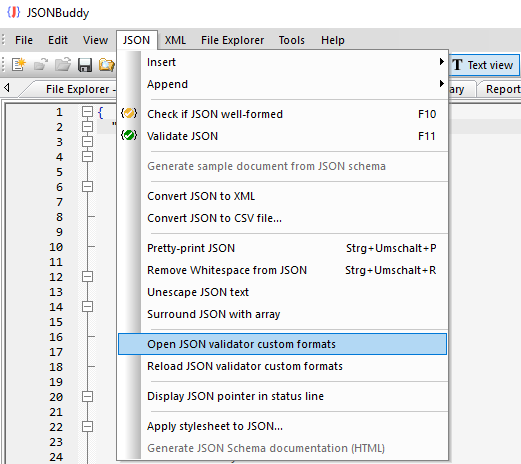
JSONBuddy for Windows showing a custom JSON validator format configuration
Authentic Help evidence of custom format configuration; commands and format behavior require current-build confirmation.

Define a format in JSON configuration

The retained workflow uses a JSON configuration document with a format name and a regex expression. Keep the definition small and test the expression with a representative valid and invalid value before applying it to a shared schema.

[{ "format": "my-custom-format", "regex": "^[A-Za-z/]+$" }]

Reload and test the definition

  1. Open the current custom-formats configuration command and edit the JSON.
  2. Save the configuration, then run the current reload command.
  3. Validate a known valid and invalid JSON instance that uses the named format.
  4. Inspect editor assistance where the current release exposes format names.

The legacy Help says a user definition can override a built-in format and that open documents are revalidated after reload. Treat override precedence, automatic revalidation, labels, and assistance as release-sensitive until checked in the current Windows build.

Related tasks

Keep format definitions reviewable

Use a descriptive format name, keep the regular expression readable, and record a small set of expected matches and non-matches beside the schema that uses it. A format is a validation rule, not an invitation to accept arbitrary text. If the schema is shared, keep the configuration file, sample data, and validation outcome together so another maintainer can reproduce the result.

When changing an existing name, first determine whether another schema relies on the built-in meaning. Test a copy of the configuration and reopen or revalidate representative documents only after the current release’s reload behavior has been confirmed.