

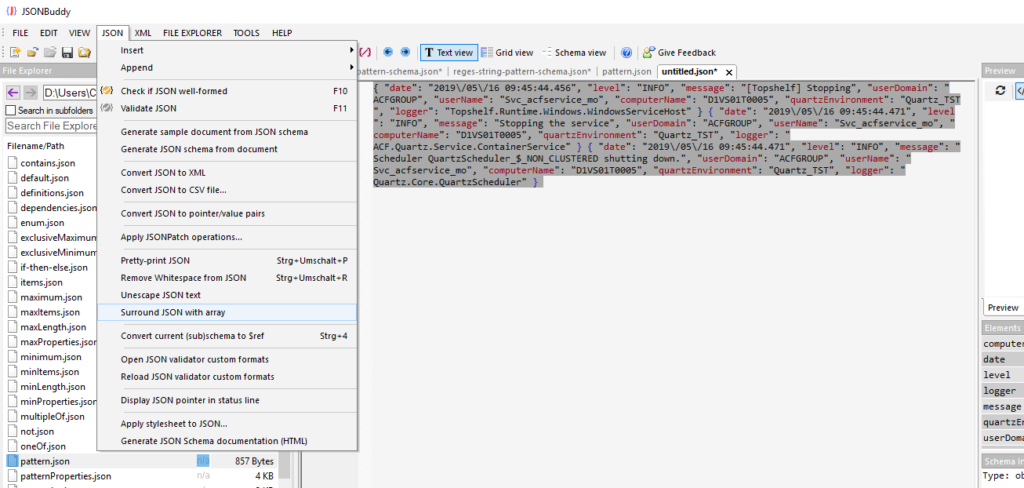
Identify the log shape before validation
A log described as “JSON” may be a sequence of independently written JSON objects rather than one complete JSON array or object. An editor can correctly report a format issue when it is asked to interpret that sequence as a single JSON document. First inspect the beginning and boundary between entries so the input structure is clear.
Surround a sequence with a JSON array
- Open the log data and confirm that consecutive entries are JSON objects.
- Select the relevant entries, or use the whole document when the sequence is the complete input.
- Use the retained Surround with JSON array command.
- Review the resulting array, then pretty-print or inspect it in the editor.
The legacy article says the command acts on the current selection or the whole document when no selection is set. Confirm exact current command behavior, whitespace handling, large-file suitability, and error reporting with the release candidate.
Review the result as data, not only text
Once the sequence is a well-formed array, use the text or Grid view that suits its size and shape. Validate the resulting JSON before treating it as a faithful representation of the source log. Preserve the original log separately: surrounding entries for review changes the document structure and should not overwrite operational evidence.
Continue with an appropriate workflow
Use large-data view guidance for sizeable logs, JSON pretty-print for formatting, or JSON validation to inspect structural errors after preparation.