
Validate JSON step by step

How to use the JSON validator

Assign a JSON Schema to a document, use schema-aware editing feedback, run an explicit validation, and follow each result back to the JSON value and schema rule that need attention.

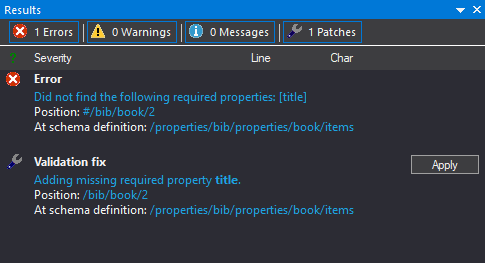
JSONBuddy validation Results pane with an error, JSON location, schema location, and suggested fix
The Results pane connects a missing required property to both its JSON position and the relevant schema definition.
  • AssignConnect data to a schema
  • DiagnoseInspect result locations
  • VerifyRun the check again

The common desktop path

Move from an open JSON document to a verified correction

This retained landing page covers the interactive Windows editor workflow. The validation debugger, streaming validator, and command-line validator remain separate pages because they answer different tasks.

1

Open the JSON document and assign a schema

Open the document, then use the Quick Associations pane to select the root JSON Schema. The existing page documents that the association is saved for the active document and also exposes schema-pool selection as an advanced path.
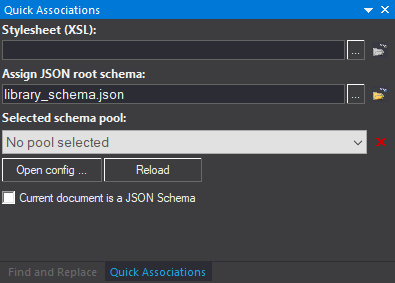
JSONBuddy Quick Associations pane with library_schema.json assigned as the JSON root schema
Quick Associations provides the root-schema field and schema-pool selection.
2

Edit with schema-aware feedback

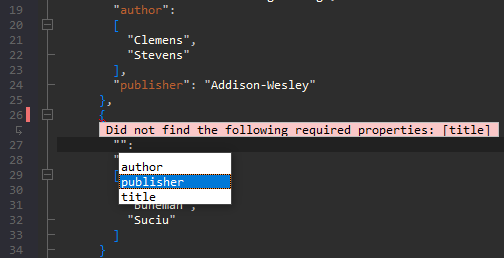
Use syntax coloring, folding, brace highlighting, and context-sensitive entry helpers while the assigned schema remains in context. Background validation can expose errors directly in the editor as the document changes.

JSONBuddy editor showing a missing required title property and schema-aware property suggestions
An inline diagnostic and entry helper keep the failed rule close to the edit.
3

Run validation and inspect every result

The existing workflow uses the Validate JSON command and documents F11 as its shortcut. The Results pane lists validation and well-formedness findings and supports copying the result set for review.

JSONBuddy validation Results pane listing a missing required property and its schema location
The result identifies the JSON position, schema definition, and an available correction.
4

Fix the document and validate again

Select a result to return to the related editor position, compare the instance location with the violated schema rule, make the correction, and repeat validation until the intended check passes.

Verify the current pane names, menu path, shortcut, background-validation behavior, copy command, and automatic-fix behavior against the release candidate.

Platform availability

Choose where to run this workflow

Only platforms supported by approved evidence for this specific workflow are shown. Links are limited to implemented, verified destinations.

  • Desktop / WindowsFeatured access: interactive schema assignment, editing, diagnostics, and correction in JSONBuddy.
  • CLI / CIAvailable as a separate automation path after the interactive rule has been tested.

Choose the next validation task

Continue without collapsing distinct workflows

Use Help for concise current-product instructions, the validator overview for capability evaluation, batch validation for collections of files, and the CLI hub for scripts and CI.